- One QR scan opens a fast, mobile-first menu — no app download, no friction
- Browse by category, search by name, and filter veg / non-veg instantly
- Mouth-watering photos and clear descriptions help guests decide faster — and order more
- Always up to date — change a price or mark something sold out and it's live in seconds
The complete operating system for a modern restaurant
MenuQR
From a beautiful digital menu to full restaurant management — orders, kitchen, reservations, inventory, and your team — all in one platform.
Prepared for restaurant owners ready to run a smarter operation
Running a restaurant is harder than it needs to be
Paper, spreadsheets, and disconnected tools create chaos — and leave owners flying blind.
1
Paper menus hold you back
Every price change or new dish means another print run — or guests ordering something you no longer serve.
2
Orders get lost in translation
Scribbled tickets, shouted orders, relayed instructions — mistakes happen and guests pay the price.
3
No visibility into your business
What's your busiest hour? Best-selling dish? Actual food cost? Without data, decisions are gut feel — and guesses are expensive.
4
Operations run on whiteboards and memory
Staff schedules on paper, stock tracked in notebooks, reservations in a diary — nothing talks to anything else.
One platform, three layers — built for how restaurants actually work
MenuQR connects your front of house, kitchen, and back office into a single system your whole team can use.
①
Guest Experience
A beautiful QR menu. Table-side ordering. Live order tracking. Call waiter and request bill — all from a guest's phone, no app needed.
②
Kitchen & Floor Ops
A real-time Kitchen Display System. A dedicated Waiter Station. Orders flow instantly from guest phones to the kitchen — zero paper, zero shouting.
③
Restaurant Management
Analytics, reservations, inventory cost tracking, and employee scheduling — everything an owner needs to run a tight, profitable operation.
A dining experience your guests will talk about
From the first scan to the final bill — every guest touchpoint, seamlessly handled from their own phone.
A menu that feels like a modern app
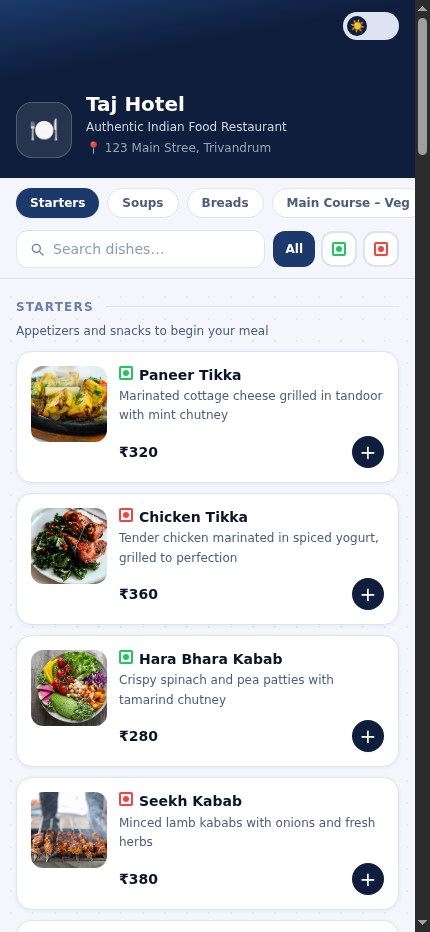
Looks great in any setting — day or night
- One-tap light / dark mode keeps the menu comfortable in dim dining rooms or bright patios
- A polished, branded look that reflects well on your restaurant — not a clunky PDF
- Works on every phone and browser — nothing for guests to install or update
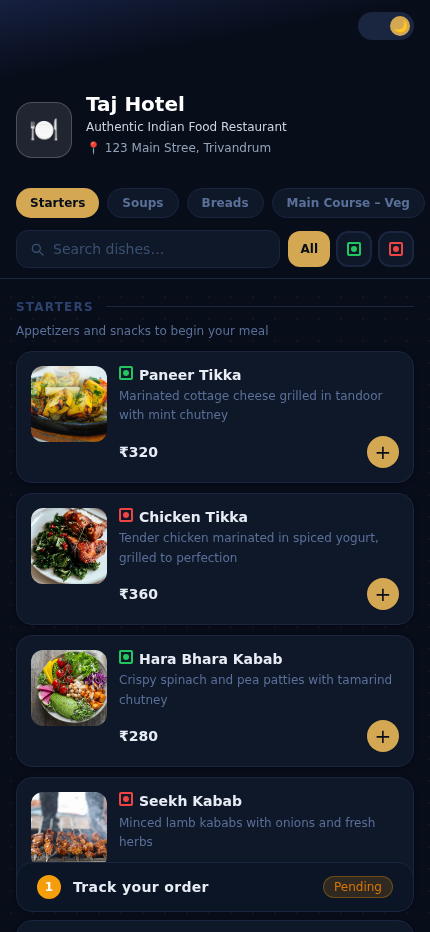
The whole table orders together, from their own phones
- Each table gets its own QR code — scan it and you're in your table's live shared cart
- Everyone at the table sees the same cart in real time — add a dish and your friends see it appear instantly
- One tap places the order for everyone straight to the kitchen — no waiting for a waiter to come round
- Need to add something? Tap to re-order while the first round is still being prepared
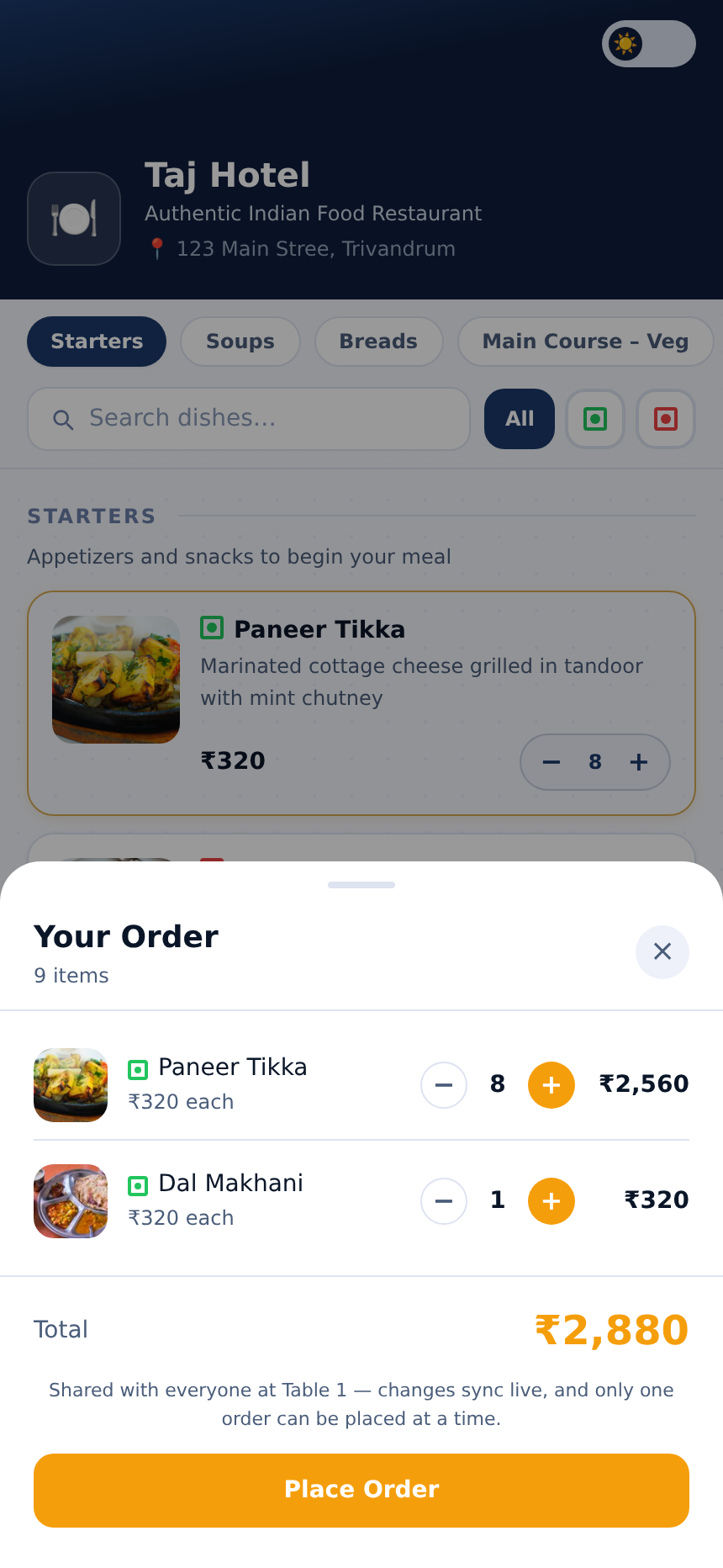
Instant confirmation, live status, and one-tap service requests
- Guests get immediate confirmation when their order hits the kitchen — no uncertainty
- A live status pill — Pending → Preparing → Ready — keeps everyone informed without flagging down staff
- Call Waiter — one tap sends an alert straight to the waiter station, with auto-dismiss after 3 minutes
- Request Bill — guests signal they're ready to pay; the waiter station shows a "Ready to Bill" alert
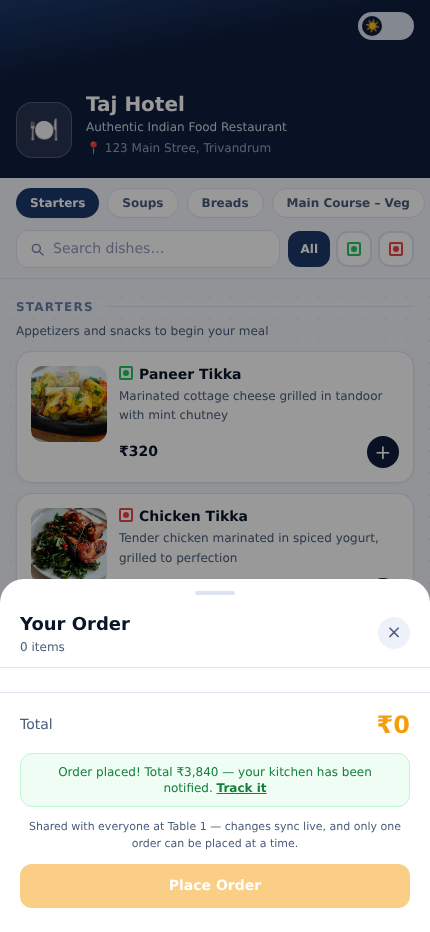
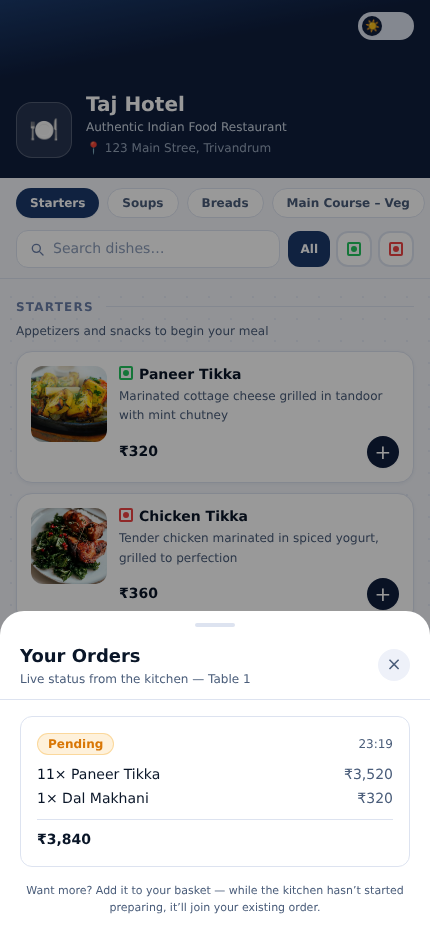
From order placed to dish served — no friction
Dedicated screens for your kitchen team and floor staff, all connected to the same live data stream.
Every order, live on your kitchen screen — the moment it's placed
- Orders appear on the kitchen display instantly — no printed tickets, no shouting, no missed items
- Color-coded columns show what's New, Preparing, and Ready at a glance — the whole kitchen stays in sync
- An audio alert fires on every new order; time-stamps show how long each ticket has been waiting
- Mark a dish done with one tap — guests see their status update immediately on their phone
Kitchen Display — Spice Garden · 4 active orders
🔔 New (2)
Table 3
Dal Makhani
Butter Naan × 2
Lassi
⏱ Just now
Table 7
Paneer Tikka
Roti × 3
⏱ 2 min ago
⚡ Preparing (1)
Table 1
Chicken Biryani
Raita
Papad
⏱ 8 min ago
✓ Ready (1)
Table 5
Naan × 4
Gulab Jamun × 2
⏱ Ready to serve
Your floor staff stays in control — without running to the counter
- Waiters get a live view of all table orders on a dedicated screen — pending, preparing, and done
- Instant orange alert when a guest calls for a waiter or requests the bill — never miss a signal again
- Take orders on behalf of customers at the table — edit quantities, add notes, remove items before sending to the kitchen
- Staff access is role-based — assign waiter, KDS, or both roles to each staff member by email
Waiter Station — Spice Garden
Table 4 · Calling for a waiter 2 min ago
Dismiss
Table 2 · Ready to Bill just now
Generate Bill
Table 1 · 3 items
Preparing
Chicken Biryani, Raita, Papad
Table 6 · 2 items
Pending
Paneer Butter Masala, Naan × 2
Table 3 · 3 items
Pending
Dal Makhani, Butter Naan × 2, Lassi
Run a tighter, more profitable restaurant
Analytics, bookings, stock control, and your team — all the back-of-house tools that used to live in notebooks and spreadsheets.
Know exactly what's working — with data, not guesswork
- Revenue and order counts for today, last 7 days, and last 30 days — at a glance on one dashboard
- See your top-selling dishes and identify which items drive the most revenue
- Peak hour chart shows when your restaurant is busiest — so you know exactly when to staff up
- Payment method breakdown tracks cash vs. card vs. UPI across every billing session
Analytics — Last 7 days
Revenue
₹1,28,450↑12%
Orders
347↑8%
Avg. order
₹370
Peak hours — orders by time of day
10111213141516171819202122
Top items this week
Chicken Biryani
84
Butter Naan
65
Paneer Tikka
46
Dal Makhani
35
Never lose a booking — manage every reservation in one place
- Log reservations with guest name, phone, party size, table, date, time, and notes
- Date-picker view shows all bookings for any day in seconds — no flipping through a diary
- Mark guests as Confirmed, Seated, No-show, or Cancelled — keep your floor plan accurate in real time
- Special-request notes per booking: dietary needs, anniversaries, VIP guests — nothing gets forgotten
Reservations — Sat, 28 Jun 2026
Saturday, 28 June · 5 bookings · 18 covers
12:00
Sharma Family
Party of 6 · Table 8 · Anniversary
12:30
Priya Mehta
Party of 2 · Table 3
13:00
Rahul Verma
Party of 4 · Table 5
19:30
Corporate — TCS Team
Party of 12 · Tables 2 + 4
20:00
Anita & Rohan
Party of 2 · Table 1 · Birthday
Know your food costs before a dish leaves the kitchen
- Track ingredient stock quantities with low-stock alerts — know before you run out mid-service
- Link ingredients to menu items to automatically calculate each dish's exact food cost
- Live margin calculator per dish — green if profitable, amber if borderline, red if you're losing money
- Update stock inline as deliveries arrive — no separate stock system to maintain
Inventory & Cost Tracking
Recipe Costs & Margins
| Dish | Price | Cost | Margin |
|---|---|---|---|
| Chicken Biryani | ₹280 | ₹96 | 65% |
| Paneer Tikka | ₹240 | ₹105 | 56% |
| Dal Makhani | ₹180 | ₹118 | 34% |
| Butter Naan | ₹60 | ₹14 | 77% |
Ingredients — Low Stock Alert
| Ingredient | Stock | Threshold |
|---|---|---|
| Paneer | 0.4 kg | 1 kg |
| Chicken | 4.2 kg | 2 kg |
| Basmati Rice | 8.5 kg | 3 kg |
Your team, scheduled and tracked — all in one roster
- Add all your staff — waiters, chefs, managers — with roles, contact info, and hourly rates
- Schedule shifts on a weekly roster grid: click any cell to assign a shift, set start and end time
- Mark shifts as Scheduled, Completed, or Absent to track actual attendance vs. the plan
- See total days worked and hours per month for every employee — at a glance, no spreadsheet needed
Employee Schedule — Week of Jun 23
| Employee | Mon | Tue | Wed | Thu | Fri | Sat | Sun |
|---|---|---|---|---|---|---|---|
| Rahul K. Waiter | 9–5 | 9–5 | 9–5 | 10–6 | |||
| Priya S. Chef | 8–4 | 8–4 | Absent | 8–4 | 8–4 | 8–4 | |
| Ahmed R. Manager | 10–7 | 10–7 | 10–7 | 10–7 | 10–7 | 10–7 | |
| Sunita V. KDS | 11–7 | 11–7 | 11–7 | 11–7 | 11–7 |
Staff this week
4
Shifts scheduled
22
Completed
14
Absences
1
Everything MenuQR does for your restaurant
| Feature | Tier 1 — Digital Menu | Tier 2 — Full Platform |
|---|---|---|
| ① Guest Experience | ||
| Mobile-first digital menu with photos, search & filters | ✓ | ✓ |
| Light & dark mode, works on any browser | ✓ | ✓ |
| Self-serve menu management — update prices and dishes instantly | ✓ | ✓ |
| Per-table QR codes — orders automatically grouped by table | — | ✓ |
| Shared live cart — everyone at the table orders together | — | ✓ |
| Guests place and track orders directly from their phones | — | ✓ |
| Call Waiter & Request Bill from the guest's phone | — | ✓ |
| ② Kitchen & Floor Operations | ||
| Kitchen Display System — live, color-coded order board | — | ✓ |
| Waiter Station — alerts, order management, take-order flow | — | ✓ |
| Role-based staff access (waiter / KDS / both) | — | ✓ |
| Billing — generate, record payment, print 80mm thermal receipt | — | ✓ |
| ③ Restaurant Management | ||
| Analytics — revenue, top dishes, peak hours, payment split | — | ✓ |
| Reservations — bookings, status tracking, notes per guest | — | ✓ |
| Inventory — stock levels, low-stock alerts, ingredient costs | — | ✓ |
| Recipe costing & live margin calculator per dish | — | ✓ |
| Employee profiles, weekly shift scheduling & attendance | — | ✓ |
What a fully connected restaurant looks like
↻
Faster table turnover
Guests browse, order, and get their status without waiting on staff — freeing your team to focus on experience, not logistics.
✓
Zero order errors
Orders flow directly from a guest's phone to the kitchen screen — no mishearing, no handwriting, no relay, no remakes.
₹
Tighter cost control
Know your food margins per dish, get low-stock alerts before service, and track every rupee from order through to payment.
★
Run by data, not gut feel
Peak hours, best-sellers, staff attendance, and revenue trends — the information you need to make every week better than the last.
Ready when you are
Let's build your restaurant's operating system
Start with the Digital Menu, or go all-in with the Full Platform — we'll set everything up so you can be live within days, not months.
One platform. Every tool your team needs. No duct tape.
Let's get started